WABOOC Food Grade Utensils, Stainless Steel Fork Spoon Cutlery Set with Storage Box, Round Handle Cute Tableware
Brand: WABOOC · 14 views
Introducing our Food Grade Stainless Steel Cutlery Set, designed to make mealtime safe, convenient, and enjoyable for kids aged 3 to 8 years old! Crafted from high-quality food-grade stainless steel, this set is built to withstand daily use while ensuring no harmful chemicals leach into your child’s
Fast delivery — Delivery is calculated at checkout. Free delivery on eligible orders.
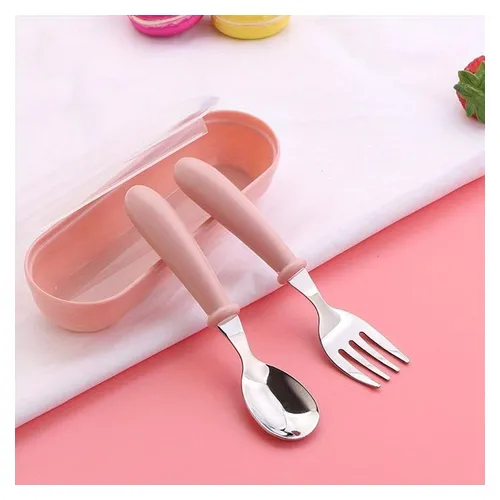
Introducing our Food Grade Stainless Steel Cutlery Set, designed to make mealtime safe, convenient, and enjoyable for kids aged 3 to 8 years old! Crafted from high-quality food-grade stainless steel, this set is built to withstand daily use while ensuring no harmful chemicals leach into your child’s food. The utensils are rigorously tested to meet safety standards, giving parents peace of mind during every meal.
The set includes a fork and spoon, perfectly sized for little hands, with smooth, round handles that are comfortable to grip and easy to hold. The ergonomic design reduces fatigue and prevents slipping, making it ideal for independent eating—helping your child build confidence at the table. The cute, playful pink color adds a fun touch, making mealtime more engaging for kids, so they’ll look forward to using their own utensils!
To keep everything organized and travel-ready, the set comes with a matching storage box. This compact, lightweight box fits easily into backpacks, lunchboxes, or diaper bags, making it perfect for on-the-go families. Whether you’re heading to a picnic, restaurant, or just a day out, you can rest assured that your child’s utensils stay clean and hygienic.
No reviews yet. Be the first to review this product!
Install our mobile / desktop app for one-click access — no app store needed, and it works on laptops too.
🔔
Order & new-product alertsGet a push notification the moment your delivery updates or new products land.
iPhone / iPad — use Safari
1 Tap the Share button in the Safari toolbar.
2 Scroll down and tap Add to Home Screen.
3 Tap Add — the P4SHOP icon appears on your home screen.
The install option only exists in Safari on iPhone/iPad — if you are reading this in Chrome or Firefox, open p4shops.com in Safari first.
Android — Chrome
1 Tap the Install app button above, or the menu in Chrome.
2 Choose Install app (or Add to Home screen).
3 Confirm — the app opens in its own window from now on.
Seeing “Unsafe app blocked / built for an older version of Android”? Uninstall the old P4SHOP app, update Chrome, then install again from this page. The website itself does not install an APK.
Android — install with Chrome
You are using Samsung Internet. Samsung’s current app packager can create an old Android package, which makes
Google Play Protect show “Unsafe app blocked — built for an older version of Android.” This is a
Samsung Internet packaging issue, not the P4SHOP website.
1 If P4SHOP is already installed, uninstall the old app: Settings → Apps → P4SHOP → Uninstall.
2 Open Chrome and visit p4shops.com.
3 Tap App → Install now. Chrome creates a current, secure Android package.
Already installed from Chrome? Close this window — the app will update automatically.
Desktop / laptop — Chrome or Edge
1 Click the install icon at the right end of the address bar (a small screen with an arrow).
2 Or open the menu ⋮ → Save and share → Install P4SHOP.
3 Click Install — it gets its own window and desktop icon.
✅ P4SHOP is installed
You are using the installed app. Turn on notifications below to hear about new products and delivery updates.
Installed securely by your browser from the official p4shops.com site over HTTPS — there is no APK to download, so Android “Play Protect” warnings do not apply. The app opens in its own window, launches from your home screen / desktop and keeps you signed in.