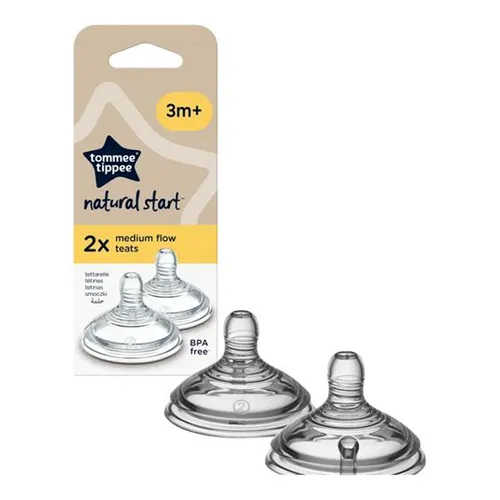
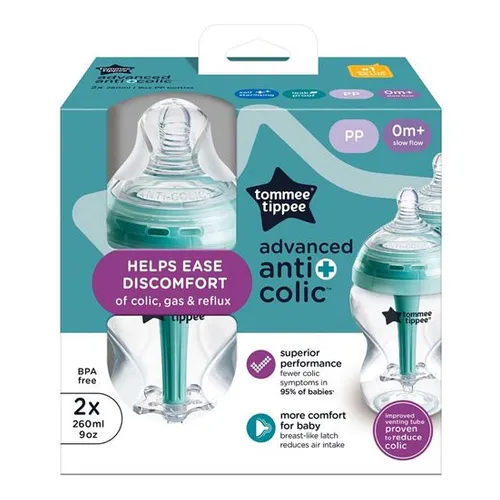
inspired by mums and designed by experts, our Advanced Anti-Colic Baby Bottle has an extra-wide neck and breast-like teat to help your baby have the most natural bottle-feeding experience with added anti-colic technology to prevent discomfort caused by gas.Tommee Tippee Advanced Anti-Colic baby bott
Fast delivery — Delivery is calculated at checkout. Free delivery on eligible orders.
inspired by mums and designed by experts, our Advanced Anti-Colic Baby Bottle has an extra-wide neck and breast-like teat to help your baby have the most natural bottle-feeding experience with added anti-colic technology to prevent discomfort caused by gas.Tommee Tippee Advanced Anti-Colic baby bottles offer superior performance, our best bottle for reducing colic symptoms†. They work a little differently from regular bottles. To help combat colic, while ensuring a comfortable feeding experience for you and your baby, the unique 3-piece, anti-colic venting system draws air away from milk and baby, meaning less wind, reflux and discomfort. Topped with our breast-like shaped teat, helping baby get the best latch and reduce air intake. Plus, the venting tube comes with a built-in heat sensing strip that gives you extra reassurance that the milk is a safe temperature for baby.For added peace of mind, the Advanced Anti-Colic baby bottle is completely mess-free and leakproof when the screw ring, teat and cap are all secured (even if it’s turned upside down or shaken). It’s also 100% BPA free so it’s safe for your baby.Tommee Tippee Closer to Nature baby bottles are available in a wide range of sizes, colours and decorations. This bottle comes with a slow flow teat that’s suitable for 0+ months. Teats are available in a range of flow rates too, so the milk can flow faster as your baby gets hungrier! Thanks to its brand-new design, the Tommee Tippee baby milk bottle is now self-sterilising, making clean-ups a whole lot easier. Follow these simple steps to sterilise your bottle in the microwave in just 3 minutes: Step 1: Thoroughly clean your bottle in warm, soapy water and rinse Step 2: Fill the bottle with 50ml of cold water Step 3: Fit the teat, screw ring and cap together and loosely place them on the bottle base. Pop in the microwave for 3 minutes Step 4: Remove the water inside the bottle and reassemble Please note that the time to sterilise will change slightly based on how many bottles you place in the microwave at once.
No reviews yet. Be the first to review this product!
Install our mobile / desktop app for one-click access — no app store needed, and it works on laptops too.
🔔
Order & new-product alertsGet a push notification the moment your delivery updates or new products land.
iPhone / iPad — use Safari
1 Tap the Share button in the Safari toolbar.
2 Scroll down and tap Add to Home Screen.
3 Tap Add — the P4SHOP icon appears on your home screen.
The install option only exists in Safari on iPhone/iPad — if you are reading this in Chrome or Firefox, open p4shops.com in Safari first.
Android — Chrome
1 Tap the Install app button above, or the menu in Chrome.
2 Choose Install app (or Add to Home screen).
3 Confirm — the app opens in its own window from now on.
Seeing “Unsafe app blocked / built for an older version of Android”? Uninstall the old P4SHOP app, update Chrome, then install again from this page. The website itself does not install an APK.
Android — install with Chrome
You are using Samsung Internet. Samsung’s current app packager can create an old Android package, which makes
Google Play Protect show “Unsafe app blocked — built for an older version of Android.” This is a
Samsung Internet packaging issue, not the P4SHOP website.
1 If P4SHOP is already installed, uninstall the old app: Settings → Apps → P4SHOP → Uninstall.
2 Open Chrome and visit p4shops.com.
3 Tap App → Install now. Chrome creates a current, secure Android package.
Already installed from Chrome? Close this window — the app will update automatically.
Desktop / laptop — Chrome or Edge
1 Click the install icon at the right end of the address bar (a small screen with an arrow).
2 Or open the menu ⋮ → Save and share → Install P4SHOP.
3 Click Install — it gets its own window and desktop icon.
✅ P4SHOP is installed
You are using the installed app. Turn on notifications below to hear about new products and delivery updates.
Installed securely by your browser from the official p4shops.com site over HTTPS — there is no APK to download, so Android “Play Protect” warnings do not apply. The app opens in its own window, launches from your home screen / desktop and keeps you signed in.